Introducing Resolve: Zero-Shot Classification Without Labeled Data
Heimdall Resolve is available now. It takes a piece of text and returns an answer from a set of answers you define. There is no labeled dataset, no training job, and no Gold table from Lake.
Most teams already know the answers.
A charge goes to billing. An outage goes to the front of the queue. A message that includes a home address does not get delivered. The slow part is applying that judgment to every new ticket, email, listing, or note.
A person can do it, until the inbox outgrows the person. A rules engine can do it, until the wording changes. A model can learn it, after someone labels a pile of old examples.
Resolve starts from the question.
You name the Resolve, write what you want resolved, and define the answers in plain language. Then you send the next piece of text to an API and get the answer back, with a confidence and the probability on every option you defined.
You write the question once. Resolve asks it of every new piece of text.
One question, two kinds of answer
Each Resolve asks one question. You choose the kind when you create it, and it stays fixed, so the response your application receives does not change shape later.
Choice
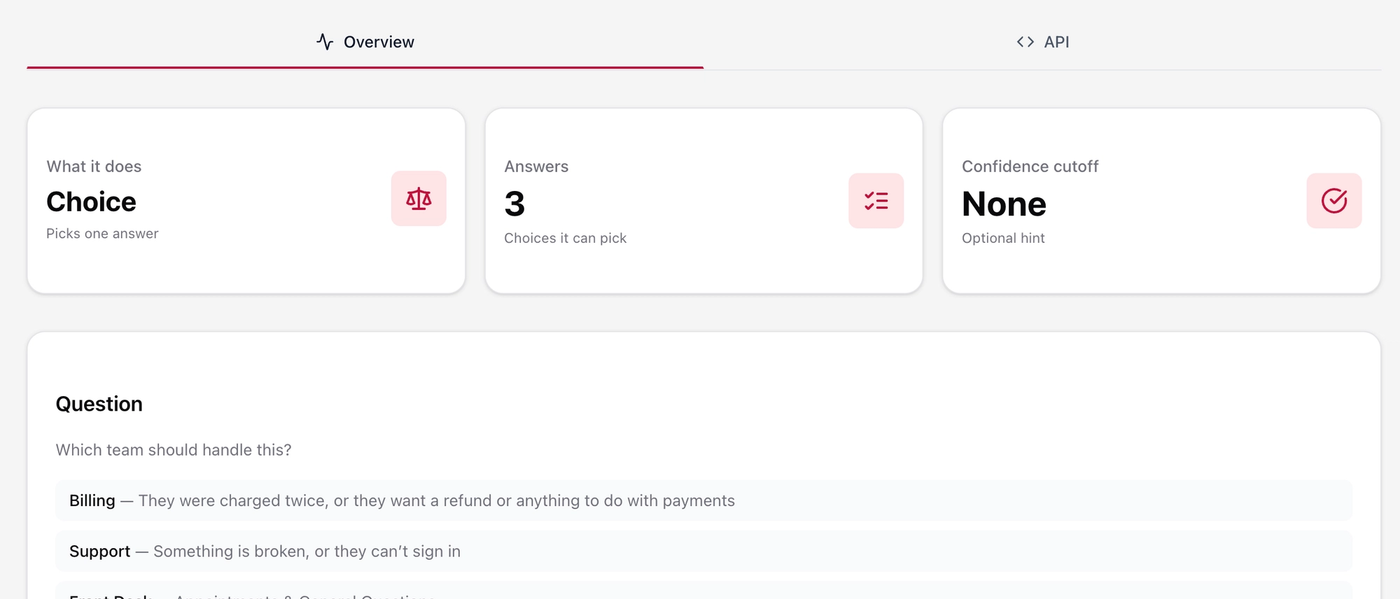
Choice lets you name every answer Resolve is allowed to pick, from 2 up to 255.
Each answer has a short name and a description explaining when to pick it.
A support desk might use:
- Billing — a charge, refund, or invoice
- Support — something is broken or the customer cannot sign in
- Sales — a demo, plan change, or new seat
The API returns the selected answer, a confidence from 0 to 1, and a probability for every answer you defined.
Those probabilities sum to 1, so you can see not only what Resolve selected, but how the other options compared.
Score
Score lets you define an ordered scale from low to high, from 2 up to 10 levels.
Urgency might run from:
Can wait
Soon
Needs someone now
The API returns a score on that scale, a confidence, the weight on each level, and the legend you wrote.
The score can fall between two levels. A 2.4 on a three-point scale is closer to “soon” than to “needs someone now,” while the weights show how the result leans across the scale.
The same idea can be used for anything where the answer has an order: urgency, risk, severity, priority, or another numerical judgment your application needs to make.
Confidence lets you decide when to ask a person
Automation does not have to mean that every decision is automatic.
A cutoff is optional. Leave it blank and every call returns an answer your application can use.
Set the cutoff to 0.8, for example, and your application can treat anything below that as ask a person.
The API still returns the full choice or score and the full probabilities either way. Your application compares the confidence to the cutoff and decides what happens next.
That gives you a simple human-in-the-loop workflow:
High confidence → automate
Low confidence → ask a person
The person is not starting with a blank ticket. They receive the suggested answer, the confidence, and the alternatives that were considered.
A ticket doesn't need to know where it belongs
Consider a customer who writes:
“I was charged twice for the annual plan and I need the second charge reversed.”
The Choice question is:
Which team should handle this?
The answers are the ones the support desk already uses:
- Billing: a charge, a refund, or an invoice
- Support: something is broken, or the customer cannot sign in
- Sales: a demo, a plan change, or a new seat
A response might look like this:
Choice: Billing
Confidence: 0.91
Probabilities:
- Billing: 0.91
- Support: 0.07
- Sales: 0.02
Your application can use the result to route the ticket before anyone opens it.
The probabilities remain attached to the result, so a lead can see when the decision was close and override it if necessary.
The same question is applied to the next ticket, and the one after that—including the one a new hire might otherwise have sent to three different places.
The same inbox, scored for speed
Routing says who owns the ticket. It does not say who should answer first.
A password reset and a checkout outage can arrive in the same inbox. Until someone reads them, they may look like two more tickets in the queue.
A second Resolve can ask a Score question:
How quickly does someone need to respond?
The levels might be:
Can wait
Soon
Needs someone now
Now consider:
“Checkout has been down for twenty minutes. Customers cannot pay.”
The result can land near the top of the scale, with most of the weight on “needs someone now.”
Compare that with:
“Can you reset my password when you have a minute?”
That score sits low, near “can wait.”
Your application can use the score to prioritize the queue.
A score between two levels still tells you which way the request leans, and the legend in the response explains what each level means. The number is not a private code that only exists inside the model.
Low confidence stays visible in the result. With a cutoff set, those tickets can wait for a person. The rest of the queue can move automatically.
The inbox, as a system
The two Resolves are the whole design.
One Choice question assigns the queue. One Score question places the ticket on the scale your team actually uses. The help desk, form, or shared inbox calls both with the same text.
A new message arrives:
“I was charged twice for the annual plan and I need the second charge reversed.”
The Choice Resolve returns Billing, with Support and Sales still visible as smaller probabilities.
The Score Resolve places the ticket on your urgency scale.
Your application can now place the ticket in Billing and order it against everything else already there.
A second message arrives:
“Checkout has been down for twenty minutes. Customers cannot pay.”
The Choice Resolve sends it to Support.
The Score Resolve puts it near “needs someone now,” so your application can place it ahead of the password reset that can wait.
Anything under the cutoff you set—say 0.8—can wait for a person.
The API still returns the suggested queue, the score, and the full probabilities, so the person is reviewing a recommendation rather than starting from a blank ticket.
Leave the cutoff blank and every call returns an answer your application can use immediately.
When Billing's definition changes, you edit the description on that answer.
When refunds need to go to a specialist queue, you add the queue and describe when to select it.
When the urgency scale changes, you edit a level.
The next ticket uses the new wording.
There is no new labeled export and no retraining step.
What if you trained a traditional classifier instead?
A traditional classifier solves the problem from the other direction.
It learns the queues from tickets someone has already labeled.
You export a history of messages. People tag each one Billing, Support, or Sales. You need enough examples of every queue, including the rare ones. You hold some back, train, and evaluate the result.
If the labels are clean and consistent, this approach can be useful. A model can learn patterns from historical examples that you may never think to write down explicitly.
But the starting point is different.
A classifier starts with examples.
Resolve starts with the decision.
For a new support desk, the history can be the obstacle.
The labels may not exist yet. The ones that do exist may disagree because the rule lived in people's heads and different people interpreted it differently.
A queue you are adding this month might have only a handful of examples, giving a traditional classifier very little historical data to learn from.
Urgency can be even harder.
The priority field may have been optional. Customers skipped it. Different teams used different scales. “Urgent” might have meant one thing six months ago and something completely different today.
A policy change can also require a new training cycle.
Suppose:
“Refunds now go to a specialist queue.”
With a traditional classifier, you may need to identify and relabel historical refund tickets, retrain the model, evaluate it again, and deploy the updated version.
Resolve approaches that change differently.
The Choice descriptions are the routing policy.
The Score levels are the urgency policy.
You change the definition, and the next piece of text is evaluated against the new definition.
Resolve does not require you to first create a labeled dataset of historical examples. You define the question and the answers, then send text to the API.
That makes it useful when you already know the decision you want to make but do not want to build a training dataset just to make that decision.
When should you use Resolve?
Resolve is useful when your application repeatedly needs to make a defined decision from unstructured text.
For example:
- Which team should receive this ticket?
- How urgent is this request?
- Which category does this message belong to?
- Should this content be delivered or blocked?
- Which workflow should process this request?
- How severe is this incident?
- Which type of customer is making this request?
- Which queue should handle this lead?
The common pattern is simple:
The input is text. The output needs to be a structured decision.
A customer can write:
“I was charged twice and need someone to fix this.”
Your application needs something more useful than another block of text.
It needs:
Department: Billing
Confidence: 0.91
That structured result can drive the next step of the workflow.